在单仓库中部署
🌐 Deploy in a Monorepo
在单一代码库中部署 Mastra 与部署独立应用的流程相同。本指南涵盖单一代码库的特定注意事项。有关核心构建和部署步骤,请参见 部署 Mastra 服务器。
🌐 Deploying Mastra in a monorepo follows the same process as a standalone application. This guide covers monorepo-specific considerations. For the core build and deployment steps, see Deploy a Mastra Server.
支持的单体仓库Direct link to 支持的单体仓库
🌐 Supported monorepos
Mastra 合作对象包括:
🌐 Mastra works with:
- npm 工作区
- pnpm 工作区
- Yarn 工作区
- Turborepo
已知的限制:
🌐 Known limitations:
- Bun 工作区 - 部分支持;已知问题
- Nx - 你可以使用 Nx 的 支持的依赖策略,但你需要在工作区包内拥有
package.json文件
示例结构Direct link to 示例结构
🌐 Example structure
在此示例中,Mastra 应用位于 apps/api:
🌐 In this example, the Mastra application is located at apps/api:
apps/
├── api/
│   ├── src/
│   │   └── mastra/
│   │       ├── agents/
│   │       ├── tools/
│   │       ├── workflows/
│   │       └── index.ts
│   ├── package.json
│   └── tsconfig.json
└── web/
packages/
├── ui/
└── utils/
package.json
从单一代码库构建Direct link to 从单一代码库构建
🌐 Building from a monorepo
使用你的 monorepo 工具从正确的包运行构建命令。无需使用特殊标志。
🌐 Use your monorepo tool to run the build command from the correct package. There's no need for special flags.
示例:
🌐 Examples:
- npm
- pnpm
- yarn
- Turborepo
npm run build --workspace=apps/api
pnpm --filter api run build
yarn workspace api build
turbo run build --filter=api
你的包的 build 脚本应该运行 mastra build:
🌐 Your package's build script should run mastra build:
{
  "scripts": {
    "build": "mastra build"
  }
}
工作区包Direct link to 工作区包
🌐 Workspace packages
当你的 Mastra 应用从其他工作区包导入时,Mastra 会自动处理此操作:
🌐 When your Mastra application imports from other workspace packages, Mastra handles this automatically:
- 如果该包是预编译的(例如,使用
tsc或tsdown构建),Mastra 会导入已编译的 JavaScript - 如果包中包含未编译的 TypeScript,Mastra 会在构建过程中进行转译
对于大多数设置,这无需配置即可使用。如果遇到工作区包导入问题,请将该包添加到 transpilePackages:
🌐 For most setups, this works without configuration. If you encounter issues with workspace package imports, add the package to transpilePackages:
export const mastra = new Mastra({
  bundler: {
    transpilePackages: ["@my-org/utils"],
  },
});
环境变量Direct link to 环境变量
🌐 Environment variables
将 .env 文件存储在 Mastra 应用目录中(例如 apps/api/.env),而不是 monorepo 根目录。
🌐 Store .env files in the Mastra application directory (e.g., apps/api/.env), not the monorepo root.
部署配置Direct link to 部署配置
🌐 Deployment configuration
在部署到云服务提供商时,确保选择了正确的包作为部署目标。将 monorepo 根目录而不是应用目录(例如 apps/api)作为目标是一个常见错误。
🌐 When deploying to cloud providers, ensure the correct package is selected as the deploy target. Selecting the monorepo root instead of the application directory (e.g., apps/api) is a common mistake.
大多数提供商允许你在他们的控制面板或配置文件中指定根目录。
🌐 Most providers let you specify the root directory in their dashboard or configuration file.
Mastra 云Direct link to Mastra 云
🌐 Mastra Cloud
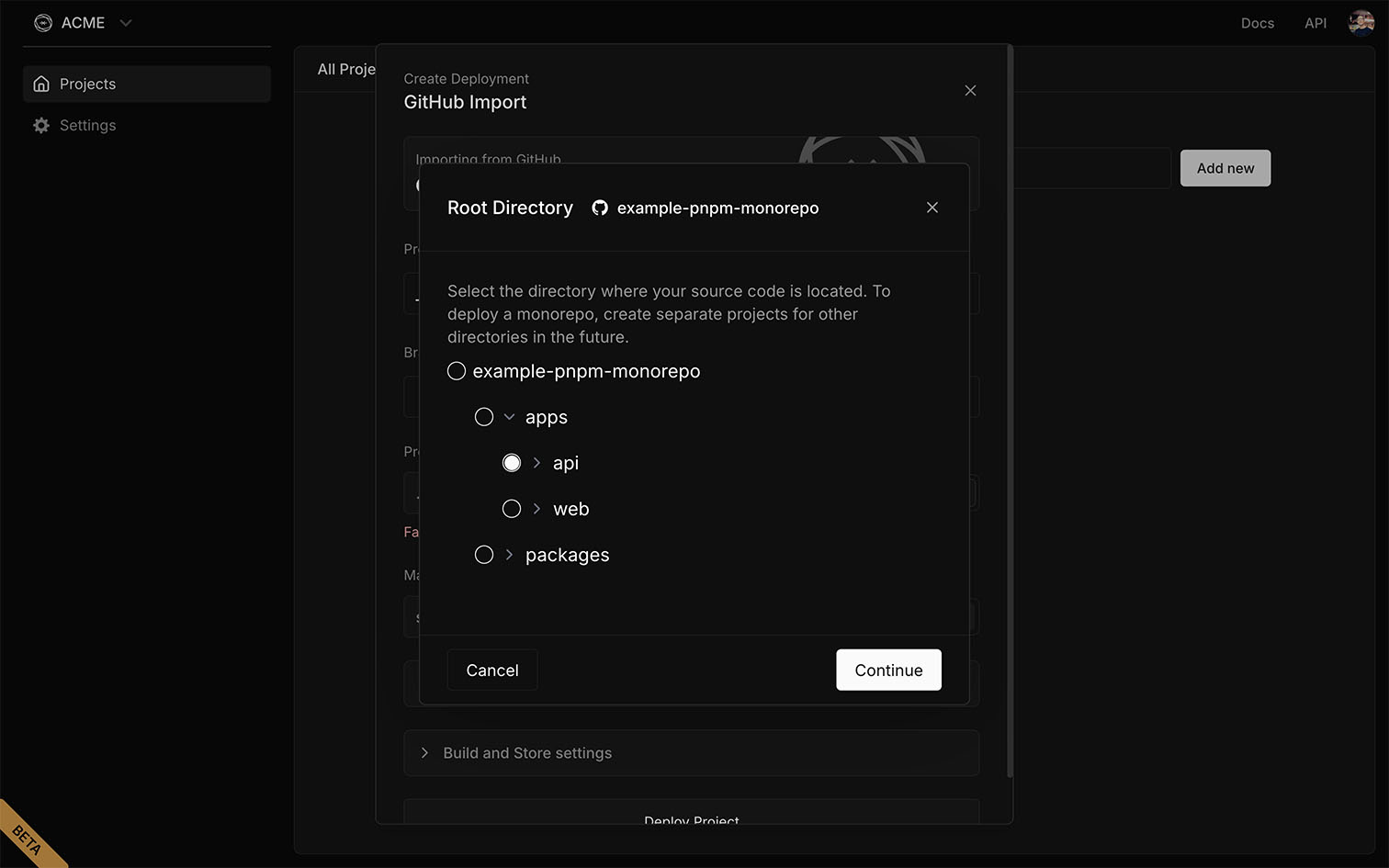
下图展示了在部署到 Mastra Cloud 时如何选择 apps/api 作为项目根目录。虽然不同提供商的界面可能有所不同,但配置保持不变。
🌐 The image below shows how to select apps/api as the project root when deploying to Mastra Cloud. While the interface may differ between providers, the configuration remains the same.
依赖管理Direct link to 依赖管理
🌐 Dependency management
保持依赖一致以避免版本冲突和构建错误:
🌐 Keep dependencies consistent to avoid version conflicts and build errors:
- 在 monorepo 根目录使用单一锁文件,以便所有包解析相同的版本
- 对共享库(如 Mastra 或框架)的版本进行对齐,以防止重复
故障排除Direct link to 故障排除
🌐 Troubleshooting
未找到工作区包Direct link to 未找到工作区包
🌐 Workspace package not found
如果 Mastra 无法解析工作区包,请确保:
🌐 If Mastra can't resolve a workspace package, ensure:
- 该软件包已列在你的
package.json依赖中 - 你的锁文件是最新的(
pnpm install、npm install等) - 该包在其
package.json中具有有效的main或exports字段
来自工作区包的 TypeScript 错误Direct link to 来自工作区包的 TypeScript 错误
🌐 TypeScript errors from workspace packages
如果你看到来自未编译工作区包的类型错误,可以:
🌐 If you see type errors from uncompiled workspace packages, either:
- 首先构建包(推荐用于更快的 Mastra 构建)
- 在你的 Mastra 配置中将软件包添加到
transpilePackages
相关Direct link to 相关
🌐 Related
- 部署 Mastra 服务器 - 核心构建与部署指南
- 配置参考 -
bundler.transpilePackages及其他选项 - CLI 参考 - 构建命令标志