语义回忆
🌐 Semantic Recall
如果你问你的朋友上个周末做了什么,他们会在内存中搜索与“上个周末”相关的事件,然后告诉你他们做了什么。这有点像 Mastra 中语义回忆的工作方式。
🌐 If you ask your friend what they did last weekend, they will search in their memory for events associated with "last weekend" and then tell you what they did. That's sort of like how semantic recall works in Mastra.
什么是语义回忆、它的工作原理以及如何在 Mastra 中配置 → YouTube(5分钟)
🌐 What semantic recall is, how it works, and how to configure it in Mastra → YouTube (5 minutes)
语义回忆的工作原理Direct link to 语义回忆的工作原理
🌐 How Semantic Recall Works
语义回忆是基于 RAG 的搜索,帮助代理在消息不再位于【最近消息历史】(./message-history) 时,仍能在较长的交互中保持上下文。
🌐 Semantic recall is RAG-based search that helps agents maintain context across longer interactions when messages are no longer within recent message history.
它使用消息的向量嵌入进行相似性搜索,能够与各种向量存储集成,并且可以配置检索到的消息周围的上下文窗口。
🌐 It uses vector embeddings of messages for similarity search, integrates with various vector stores, and has configurable context windows around retrieved messages.
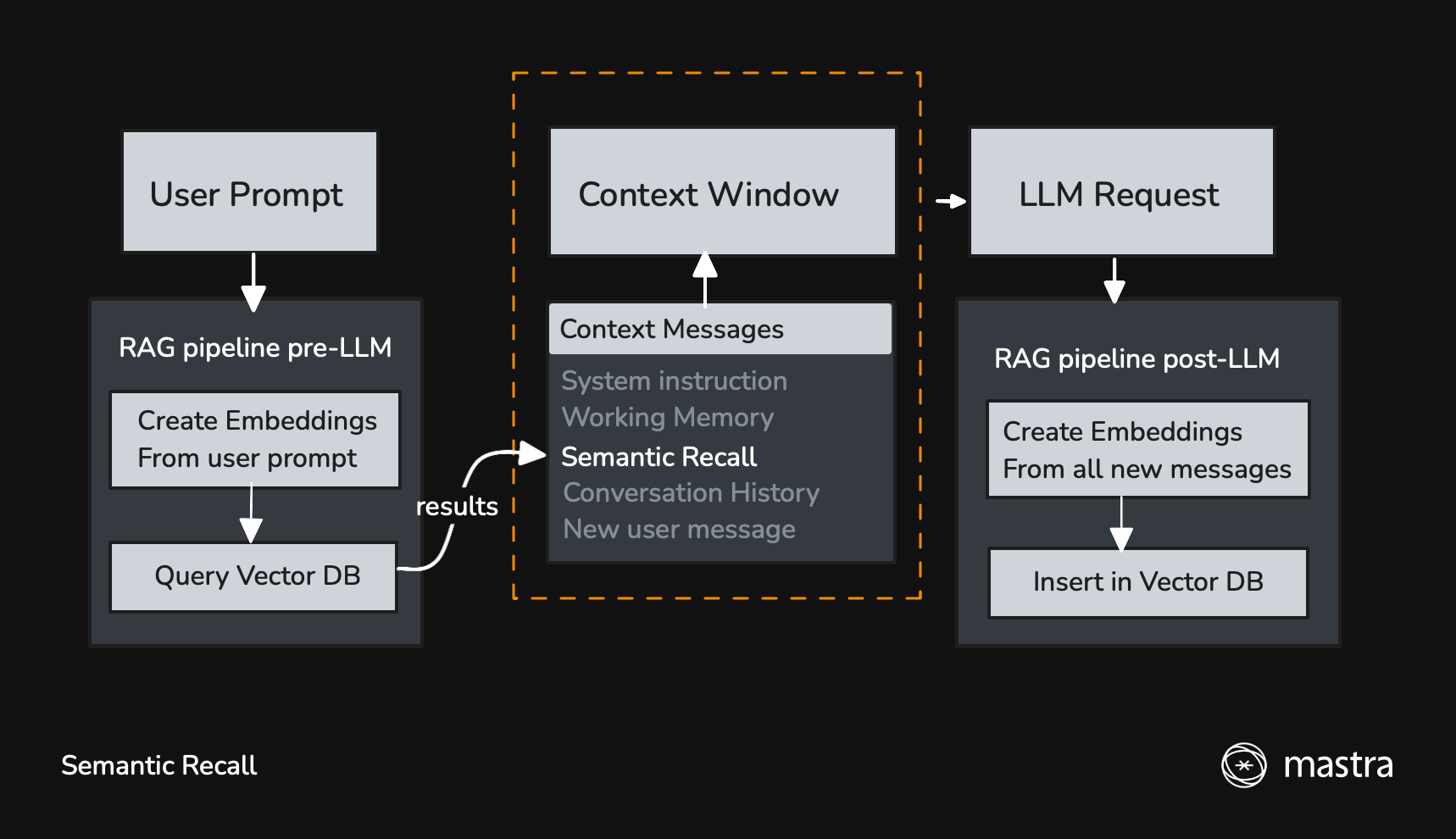
启用后,新消息将用于查询向量数据库,以寻找语义相似的消息。
🌐 When it's enabled, new messages are used to query a vector DB for semantically similar messages.
在从大型语言模型(LLM)获得响应后,所有新消息(用户消息、助理消息以及工具调用/结果)都会被插入到向量数据库中,以便在后续交互中调用。
🌐 After getting a response from the LLM, all new messages (user, assistant, and tool calls/results) are inserted into the vector DB to be recalled in later interactions.
快速开始Direct link to 快速开始
🌐 Quick Start
语义回忆默认已启用,因此如果你为你的代理提供内存,它将被包含在内:
🌐 Semantic recall is enabled by default, so if you give your agent memory it will be included:
import { Agent } from "@mastra/core/agent";
import { Memory } from "@mastra/memory";

const agent = new Agent({
  id: "support-agent",
  name: "SupportAgent",
  instructions: "You are a helpful support agent.",
  model: "openai/gpt-5.1",
  memory: new Memory(),
});
使用 recall() 方法Direct link to 使用 recall() 方法
🌐 Using the recall() Method
虽然 listMessages 通过线程 ID 获取消息并支持基本分页,但 recall() 增加了 语义搜索 支持。当你需要根据含义而不仅仅是时间顺序查找消息时,可以使用带有 vectorSearchString 的 recall():
🌐 While listMessages retrieves messages by thread ID with basic pagination, recall() adds support for semantic search. When you need to find messages by meaning rather than just recency, use recall() with a vectorSearchString:
const memory = await agent.getMemory();

// Basic recall - similar to listMessages
const { messages } = await memory!.recall({
  threadId: "thread-123",
  perPage: 50,
});

// Semantic recall - find messages by meaning
const { messages: relevantMessages } = await memory!.recall({
  threadId: "thread-123",
  vectorSearchString: "What did we discuss about the project deadline?",
  threadConfig: {
    semanticRecall: true,
  },
});
存储配置Direct link to 存储配置
🌐 Storage configuration
语义回忆依赖于存储和向量数据库来存储消息及其嵌入。
🌐 Semantic recall relies on a storage and vector db to store messages and their embeddings.
import { Memory } from "@mastra/memory";
import { Agent } from "@mastra/core/agent";
import { LibSQLStore, LibSQLVector } from "@mastra/libsql";

const agent = new Agent({
  memory: new Memory({
    // this is the default storage db if omitted
    storage: new LibSQLStore({
      id: 'agent-storage',
      url: "file:./local.db",
    }),
    // this is the default vector db if omitted
    vector: new LibSQLVector({
      id: 'agent-vector',
      url: "file:./local.db",
    }),
  }),
});
下面的每个向量存储页面都包含安装说明、配置参数和使用示例:
🌐 Each vector store page below includes installation instructions, configuration parameters, and usage examples:
- Astra
- Chroma
- Cloudflare 向量化
- Convex
- Couchbase
- DuckDB
- Elasticsearch
- LanceDB
- libSQL
- MongoDB
- OpenSearch
- Pinecone
- PostgreSQL
- Qdrant
- S3 向量
- Turbopuffer
- Upstash
召回配置Direct link to 召回配置
🌐 Recall configuration
控制语义回忆行为的三个主要参数是:
🌐 The three main parameters that control semantic recall behavior are:
- topK:要检索多少条语义相似的消息
- messageRange:每个匹配项要包括多少周围上下文
- 范围:是否在当前线程内搜索,还是在资源拥有的所有线程中搜索(默认是资源范围)。
const agent = new Agent({
  memory: new Memory({
    options: {
      semanticRecall: {
        topK: 3, // Retrieve 3 most similar messages
        messageRange: 2, // Include 2 messages before and after each match
        scope: "resource", // Search across all threads for this user (default setting if omitted)
      },
    },
  }),
});
嵌入器配置Direct link to 嵌入器配置
🌐 Embedder configuration
语义回忆依赖于嵌入模型将消息转换为嵌入。Mastra 通过模型路由使用 provider/model 字符串支持嵌入模型,或者你也可以使用任何与 AI SDK 兼容的嵌入模型。
🌐 Semantic recall relies on an embedding model to convert messages into embeddings. Mastra supports embedding models through the model router using provider/model strings, or you can use any embedding model compatible with the AI SDK.
使用模型路由(推荐)Direct link to 使用模型路由(推荐)
🌐 Using the Model Router (Recommended)
最简单的方法是使用带有自动补全支持的 provider/model 字符串:
🌐 The simplest way is to use a provider/model string with autocomplete support:
import { Memory } from "@mastra/memory";
import { Agent } from "@mastra/core/agent";
import { ModelRouterEmbeddingModel } from "@mastra/core/llm";

const agent = new Agent({
  memory: new Memory({
    embedder: new ModelRouterEmbeddingModel("openai/text-embedding-3-small"),
  }),
});
支持的嵌入模型:
🌐 Supported embedding models:
- OpenAI:
text-embedding-3-small、text-embedding-3-large、text-embedding-ada-002 - 谷歌:
gemini-embedding-001
模型路由会自动从环境变量(OPENAI_API_KEY、GOOGLE_GENERATIVE_AI_API_KEY)中检测 API 密钥。
🌐 The model router automatically handles API key detection from environment variables (OPENAI_API_KEY, GOOGLE_GENERATIVE_AI_API_KEY).
使用 AI SDK 包Direct link to 使用 AI SDK 包
🌐 Using AI SDK Packages
你也可以直接使用 AI SDK 嵌入模型:
🌐 You can also use AI SDK embedding models directly:
import { Memory } from "@mastra/memory";
import { Agent } from "@mastra/core/agent";
import { ModelRouterEmbeddingModel } from "@mastra/core/llm";

const agent = new Agent({
  memory: new Memory({
    embedder: new ModelRouterEmbeddingModel("openai/text-embedding-3-small"),
  }),
});
使用 FastEmbed(本地)Direct link to 使用 FastEmbed(本地)
🌐 Using FastEmbed (Local)
要使用 FastEmbed(本地嵌入模型),请安装 @mastra/fastembed:
🌐 To use FastEmbed (a local embedding model), install @mastra/fastembed:
- npm
- pnpm
- Yarn
- Bun
npm install @mastra/fastembed@latest
pnpm add @mastra/fastembed@latest
yarn add @mastra/fastembed@latest
bun add @mastra/fastembed@latest
然后在你的内存中配置它:
🌐 Then configure it in your memory:
import { Memory } from "@mastra/memory";
import { Agent } from "@mastra/core/agent";
import { fastembed } from "@mastra/fastembed";

const agent = new Agent({
  memory: new Memory({
    embedder: fastembed,
  }),
});
PostgreSQL 索引优化Direct link to PostgreSQL 索引优化
🌐 PostgreSQL Index Optimization
当使用 PostgreSQL 作为向量存储时,通过配置向量索引可以优化语义检索性能。这对于拥有数千条消息的大规模部署尤其重要。
🌐 When using PostgreSQL as your vector store, you can optimize semantic recall performance by configuring the vector index. This is particularly important for large-scale deployments with thousands of messages.
PostgreSQL 支持 IVFFlat 和 HNSW 索引。默认情况下,Mastra 会创建 IVFFlat 索引,但 HNSW 索引通常提供更好的性能,尤其是在使用 OpenAI 嵌入且采用内积距离时。
🌐 PostgreSQL supports both IVFFlat and HNSW indexes. By default, Mastra creates an IVFFlat index, but HNSW indexes typically provide better performance, especially with OpenAI embeddings which use inner product distance.
import { Memory } from "@mastra/memory";
import { PgStore, PgVector } from "@mastra/pg";

const agent = new Agent({
  memory: new Memory({
    storage: new PgStore({
      id: 'agent-storage',
      connectionString: process.env.DATABASE_URL,
    }),
    vector: new PgVector({
      id: 'agent-vector',
      connectionString: process.env.DATABASE_URL,
    }),
    options: {
      semanticRecall: {
        topK: 5,
        messageRange: 2,
        indexConfig: {
          type: "hnsw", // Use HNSW for better performance
          metric: "dotproduct", // Best for OpenAI embeddings
          m: 16, // Number of bi-directional links (default: 16)
          efConstruction: 64, // Size of candidate list during construction (default: 64)
        },
      },
    },
  }),
});
有关索引配置选项和性能调优的详细信息,请参阅 PgVector 配置指南。
🌐 For detailed information about index configuration options and performance tuning, see the PgVector configuration guide.
禁用Direct link to 禁用
🌐 Disabling
使用语义回调会对性能产生影响。新消息会被转换为向量嵌入,并在发送给大语言模型(LLM)之前用于查询向量数据库。
🌐 There is a performance impact to using semantic recall. New messages are converted into embeddings and used to query a vector database before new messages are sent to the LLM.
语义回忆默认是启用的,但在不需要时可以禁用:
🌐 Semantic recall is enabled by default but can be disabled when not needed:
const agent = new Agent({
  memory: new Memory({
    options: {
      semanticRecall: false,
    },
  }),
});
在以下情况中,你可能想要禁用语义回忆功能:
🌐 You might want to disable semantic recall in scenarios like:
- 当消息记录为当前对话提供足够的上下文时。
- 在对性能敏感的应用中,如实时双向音频,创建嵌入和运行向量查询所增加的延迟是明显的。
查看已撤回的消息Direct link to 查看已撤回的消息
🌐 Viewing Recalled Messages
启用追踪时,通过语义回调检索的任何消息将出现在代理的追踪输出中,同时显示最近的消息历史(如果已配置)。
🌐 When tracing is enabled, any messages retrieved via semantic recall will appear in the agent's trace output, alongside recent message history (if configured).