控制流
🌐 Control Flow
工作流会执行一系列预定义的任务,你可以控制这些流程的执行方式。任务被划分为步骤,根据你的需求可以以不同的方式执行。它们可以顺序执行、并行执行,或者根据条件选择不同的路径执行。
🌐 Workflows run a sequence of predefined tasks, and you can control how that flow is executed. Tasks are divided into steps, which can be executed in different ways depending on your requirements. They can run sequentially, in parallel, or follow different paths based on conditions.
工作流程中的每一步都通过定义好的模式与下一步相连接,以保持数据的可控性和一致性。
🌐 Each step connects to the next in the workflow through defined schemas that keep data controlled and consistent.
核心原则Direct link to 核心原则
🌐 Core principles
- 第一步的
inputSchema必须与工作流的inputSchema匹配。 - 最后一步的
outputSchema必须与工作流的outputSchema匹配。 - 每一步的
outputSchema必须与下一步的inputSchema匹配。- 如果没有,请使用 输入数据映射 将数据转换为所需的格式。
使用 .then() 链接步骤Direct link to chaining-steps-with-then
🌐 Chaining steps with .then()
使用 .then() 按顺序运行各个步骤,使每个步骤都可以访问前一步的结果。
🌐 Use .then() to run steps in order, allowing each step to access the result of the step before it.

const step1 = createStep({
  inputSchema: z.object({
    message: z.string()
  }),
  outputSchema: z.object({
    formatted: z.string()
  })
});

const step2 = createStep({
  inputSchema: z.object({
    formatted: z.string()
  }),
  outputSchema: z.object({
    emphasized: z.string()
  })
});

export const testWorkflow = createWorkflow({
  inputSchema: z.object({
    message: z.string()
  }),
  outputSchema: z.object({
    emphasized: z.string()
  })
})
  .then(step1)
  .then(step2)
  .commit();
使用 .parallel() 的同时步骤Direct link to simultaneous-steps-with-parallel
🌐 Simultaneous steps with .parallel()
使用 .parallel() 来同时运行多个步骤。所有并行步骤必须完成后,工作流才能继续到下一步。每个步骤的 id 在定义下一个步骤的 inputSchema 时使用,并成为用于访问前一步骤值的 inputData 对象上的键。并行步骤的输出随后可以被后续步骤引用或组合。
🌐 Use .parallel() to run steps at the same time. All parallel steps must complete before the workflow continues to the next step. Each step's id is used when defining a following step's inputSchema and becomes the key on the inputData object used to access the previous step's values. The outputs of parallel steps can then be referenced or combined by a following step.

const step1 = createStep({
  id: "step-1",
});

const step2 = createStep({
  id: "step-2",
});

const step3 = createStep({
  id: "step-3",
  inputSchema: z.object({
    "step-1": z.object({
      formatted: z.string()
    }),
    "step-2": z.object({
      emphasized: z.string()
    })
  }),
  outputSchema: z.object({
    combined: z.string()
  }),
  execute: async ({ inputData }) => {
    const { formatted } = inputData["step-1"];
    const { emphasized } = inputData["step-2"];
    return {
      combined: `${formatted} | ${emphasized}`
    };
  }
});

export const testWorkflow = createWorkflow({
  inputSchema: z.object({
    message: z.string()
  }),
  outputSchema: z.object({
    combined: z.string()
  })
})
  .parallel([step1, step2])
  .then(step3)
  .commit();
📹 观看:如何并行运行步骤并优化你的 Mastra 工作流程 → YouTube(3 分钟)
输出结构Direct link to 输出结构
🌐 Output structure
当步骤并行运行时,输出是一个对象,其中每个键是步骤的 id,值是该步骤的输出。这使你可以独立访问每个并行步骤的结果。
🌐 When steps run in parallel, the output is an object where each key is the step's id and the value is that step's output. This allows you to access each parallel step's result independently.
const step1 = createStep({
  id: "format-step",
  inputSchema: z.object({ message: z.string() }),
  outputSchema: z.object({ formatted: z.string() }),
  execute: async ({ inputData }) => ({
    formatted: inputData.message.toUpperCase()
  })
});

const step2 = createStep({
  id: "count-step",
  inputSchema: z.object({ message: z.string() }),
  outputSchema: z.object({ count: z.number() }),
  execute: async ({ inputData }) => ({
    count: inputData.message.length
  })
});

const step3 = createStep({
  id: "combine-step",
  // The inputSchema must match the structure of parallel outputs
  inputSchema: z.object({
    "format-step": z.object({ formatted: z.string() }),
    "count-step": z.object({ count: z.number() })
  }),
  outputSchema: z.object({ result: z.string() }),
  execute: async ({ inputData }) => {
    // Access each parallel step's output by its id
    const formatted = inputData["format-step"].formatted;
    const count = inputData["count-step"].count;
    return {
      result: `${formatted} (${count} characters)`
    };
  }
});

export const testWorkflow = createWorkflow({
  id: "parallel-output-example",
  inputSchema: z.object({ message: z.string() }),
  outputSchema: z.object({ result: z.string() })
})
  .parallel([step1, step2])
  .then(step3)
  .commit();

// When executed with { message: "hello" }
// The parallel output structure will be:
// {
//   "format-step": { formatted: "HELLO" },
//   "count-step": { count: 5 }
// }
关键点:
- 每个并行步骤的输出都由其
id键控 - 所有并行步骤同时执行
- 下一步接收一个包含所有并行步骤输出的对象
- 你必须定义下一步的
inputSchema以匹配此结构
请访问 选择合适的模式 以了解何时使用 .parallel() 与 .foreach()。
🌐 Visit Choosing the right pattern to understand when to use .parallel() vs .foreach().
.branch() 的条件逻辑Direct link to conditional-logic-with-branch
🌐 Conditional logic with .branch()
使用 .branch() 根据条件选择运行哪个步骤。分支中的所有步骤需要相同的 inputSchema 和 outputSchema,因为分支需要一致的模式,以便工作流可以沿不同路径运行。
🌐 Use .branch() to choose which step to run based on a condition. All steps in a branch need the same inputSchema and outputSchema because branching requires consistent schemas so workflows can follow different paths.
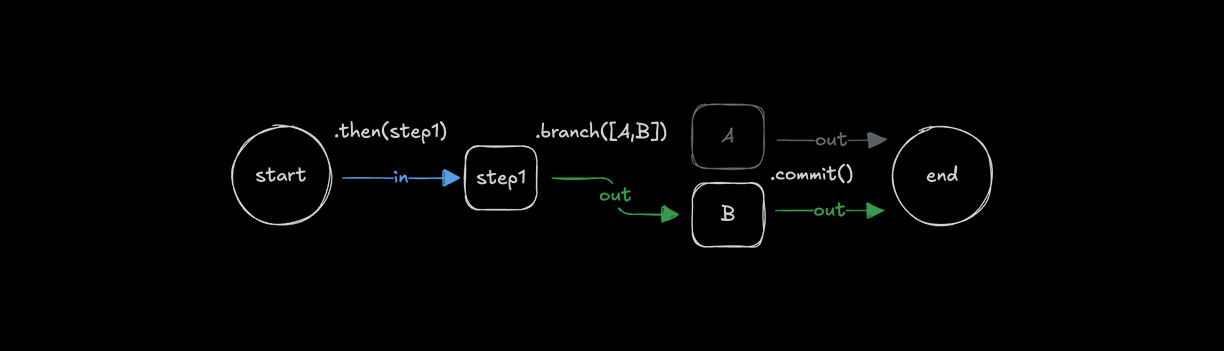
const step1 = createStep({...})

const stepA = createStep({
  inputSchema: z.object({
    value: z.number()
  }),
  outputSchema: z.object({
    result: z.string()
  })
});

const stepB = createStep({
  inputSchema: z.object({
    value: z.number()
  }),
  outputSchema: z.object({
    result: z.string()
  })
});

export const testWorkflow = createWorkflow({
  inputSchema: z.object({
    value: z.number()
  }),
  outputSchema: z.object({
    result: z.string()
  })
})
  .then(step1)
  .branch([
    [async ({ inputData: { value } }) => value > 10, stepA],
    [async ({ inputData: { value } }) => value <= 10, stepB]
  ])
  .commit();
输出结构Direct link to 输出结构
🌐 Output structure
在使用条件分支时,只有一个分支会执行,这取决于哪个条件先评估为 true。输出结构类似于 .parallel(),结果以执行步骤的 id 为键。
🌐 When using conditional branching, only one branch executes based on which condition evaluates to true first. The output structure is similar to .parallel(), where the result is keyed by the executed step's id.
const step1 = createStep({
  id: "initial-step",
  inputSchema: z.object({ value: z.number() }),
  outputSchema: z.object({ value: z.number() }),
  execute: async ({ inputData }) => inputData
});

const highValueStep = createStep({
  id: "high-value-step",
  inputSchema: z.object({ value: z.number() }),
  outputSchema: z.object({ result: z.string() }),
  execute: async ({ inputData }) => ({
    result: `High value: ${inputData.value}`
  })
});

const lowValueStep = createStep({
  id: "low-value-step",
  inputSchema: z.object({ value: z.number() }),
  outputSchema: z.object({ result: z.string() }),
  execute: async ({ inputData }) => ({
    result: `Low value: ${inputData.value}`
  })
});

const finalStep = createStep({
  id: "final-step",
  // The inputSchema must account for either branch's output
  inputSchema: z.object({
    "high-value-step": z.object({ result: z.string() }).optional(),
    "low-value-step": z.object({ result: z.string() }).optional()
  }),
  outputSchema: z.object({ message: z.string() }),
  execute: async ({ inputData }) => {
    // Only one branch will have executed
    const result = inputData["high-value-step"]?.result ||
                   inputData["low-value-step"]?.result;
    return { message: result };
  }
});

export const testWorkflow = createWorkflow({
  id: "branch-output-example",
  inputSchema: z.object({ value: z.number() }),
  outputSchema: z.object({ message: z.string() })
})
  .then(step1)
  .branch([
    [async ({ inputData }) => inputData.value > 10, highValueStep],
    [async ({ inputData }) => inputData.value <= 10, lowValueStep]
  ])
  .then(finalStep)
  .commit();

// When executed with { value: 15 }
// Only the high-value-step executes, output structure:
// {
//   "high-value-step": { result: "High value: 15" }
// }

// When executed with { value: 5 }
// Only the low-value-step executes, output structure:
// {
//   "low-value-step": { result: "Low value: 5" }
// }
关键点:
- 只有一个分支会根据条件评估顺序执行
- 输出以执行步骤的
id为键 - 后续步骤应处理所有可能的分支输出
- 当下一步需要处理多个可能的分支时,在
inputSchema中使用可选字段 - 条件按它们定义的顺序进行评估
输入数据映射Direct link to 输入数据映射
🌐 Input data mapping
在使用 .then()、.parallel() 或 .branch() 时,有时需要将前一步的输出转换以匹配下一步的输入。在这些情况下,你可以使用 .map() 来访问 inputData 并对其进行转换,以创建适合下一步的数据形状。
🌐 When using .then(), .parallel(), or .branch(), it is sometimes necessary to transform the output of a previous step to match the input of the next. In these cases you can use .map() to access the inputData and transform it to create a suitable data shape for the next step.

const step1 = createStep({...});
const step2 = createStep({...});

export const testWorkflow = createWorkflow({...})
  .then(step1)
  .map(async ({ inputData }) => {
    const { foo } = inputData;
    return {
      bar: `new ${foo}`,
    };
  })
  .then(step2)
  .commit();
.map() 方法为更复杂的映射场景提供了额外的辅助功能。
🌐 The .map() method provides additional helper functions for more complex mapping scenarios.
可用的辅助函数:
getStepResult():访问特定步骤的完整输出getInitData<any>():访问工作流的初始输入数据mapVariable():使用声明式对象语法提取和重命名字段
并行和分支输出Direct link to 并行和分支输出
🌐 Parallel and Branch outputs
在处理 .parallel() 或 .branch() 输出时,你可以使用 .map() 在将数据传递到下一步之前转换数据结构。当你需要扁平化或重构输出时,这尤其有用。
🌐 When working with .parallel() or .branch() outputs, you can use .map() to transform the data structure before passing it to the next step. This is especially useful when you need to flatten or restructure the output.
export const testWorkflow = createWorkflow({...})
  .parallel([step1, step2])
  .map(async ({ inputData }) => {
    // Transform the parallel output structure
    return {
      combined: `${inputData["step1"].value} - ${inputData["step2"].value}`
    };
  })
  .then(nextStep)
  .commit();
你也可以使用 .map() 提供的辅助函数:
🌐 You can also use the helper functions provided by .map():
export const testWorkflow = createWorkflow({...})
  .branch([
    [condition1, stepA],
    [condition2, stepB]
  ])
  .map(async ({ inputData, getStepResult }) => {
    // Access specific step results
    const stepAResult = getStepResult("stepA");
    const stepBResult = getStepResult("stepB");

    // Return the result from whichever branch executed
    return stepAResult || stepBResult;
  })
  .then(nextStep)
  .commit();
循环步骤Direct link to 循环步骤
🌐 Looping steps
工作流支持不同的循环方法,让你可以重复执行步骤直到或在满足某个条件时,或者对数组进行迭代。循环可以与其他控制方法(如 .then())结合使用。
🌐 Workflows support different looping methods that let you repeat steps until or while a condition is met, or iterate over arrays. Loops can be combined with other control methods like .then().
使用 .dountil() 循环Direct link to looping-with-dountil
🌐 Looping with .dountil()
使用 .dountil() 重复执行某个步骤,直到条件变为真。
🌐 Use .dountil() to run a step repeatedly until a condition becomes true.
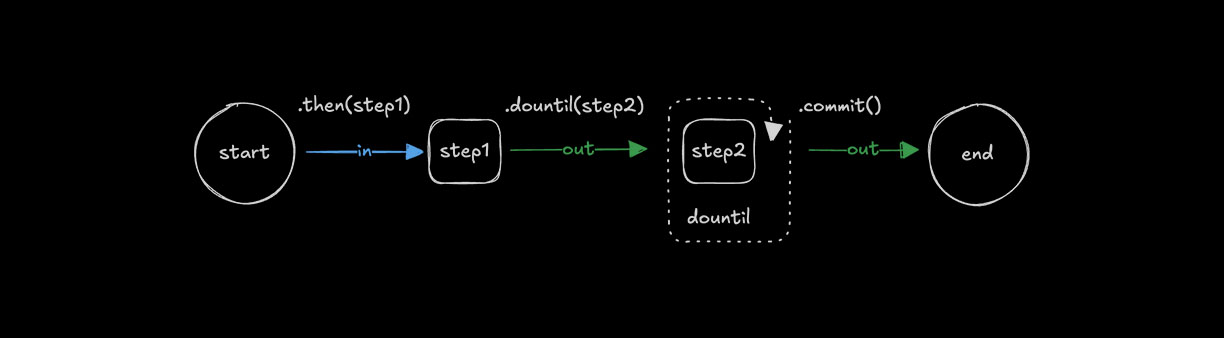
const step1 = createStep({...});

const step2 = createStep({
  execute: async ({ inputData }) => {
    const { number } = inputData;
    return {
      number: number + 1
    };
  }
});

export const testWorkflow = createWorkflow({})
  .then(step1)
  .dountil(step2, async ({ inputData: { number } }) => number > 10)
  .commit();
使用 .dowhile() 循环Direct link to looping-with-dowhile
🌐 Looping with .dowhile()
使用 .dowhile() 在条件为真时重复执行某个步骤。
🌐 Use .dowhile() to run a step repeatedly while a condition remains true.
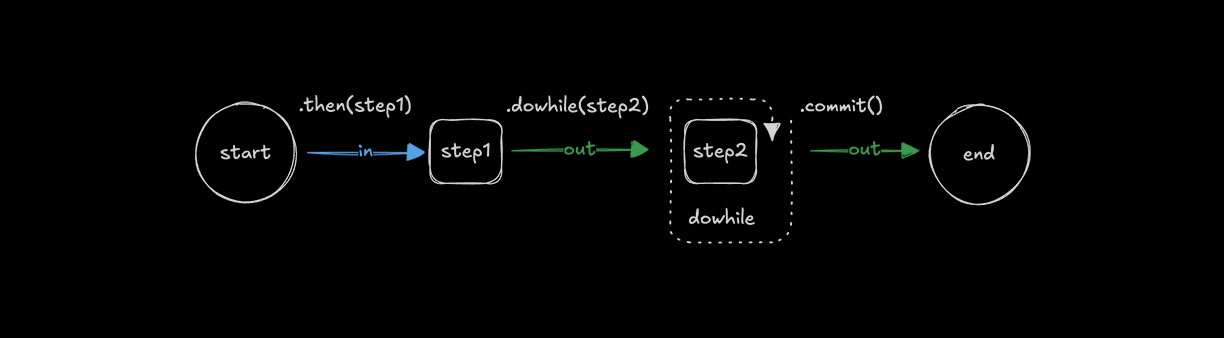
const step1 = createStep({...});

const step2 = createStep({
  execute: async ({ inputData }) => {
    const { number } = inputData;
    return {
      number: number + 1
    };
  }
});

export const testWorkflow = createWorkflow({})
  .then(step1)
  .dowhile(step2, async ({ inputData: { number } }) => number < 10)
  .commit();
使用 .foreach() 循环Direct link to looping-with-foreach
🌐 Looping with .foreach()
使用 .foreach() 对数组中的每个项目运行相同的步骤。输入必须是 array 类型,以便循环可以遍历其值,并将步骤的逻辑应用于每个值。有关何时使用 .foreach() 与其他方法的指导,请参阅 选择正确的模式。
🌐 Use .foreach() to run the same step for each item in an array. The input must be of type array so the loop can iterate over its values, applying the step's logic to each one. See Choosing the right pattern for guidance on when to use .foreach() vs other methods.
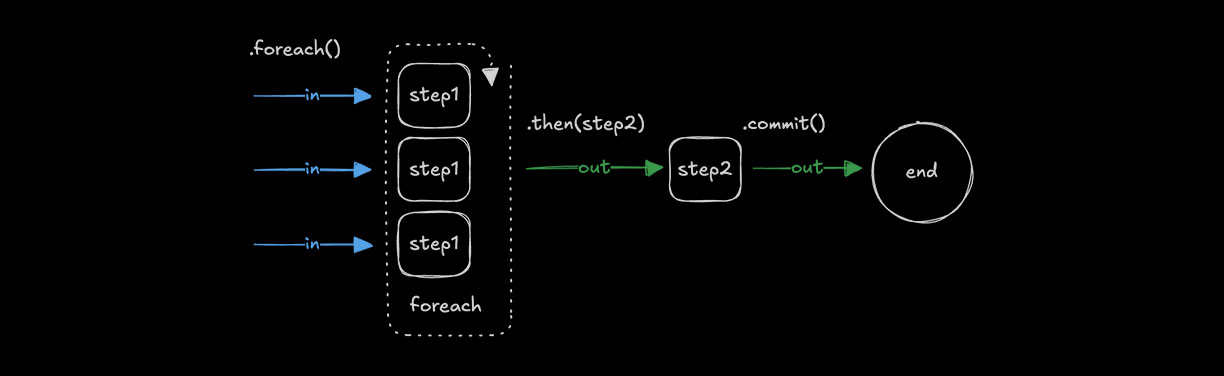
const step1 = createStep({
  inputSchema: z.string(),
  outputSchema: z.string(),
  execute: async ({ inputData }) => {
    return inputData.toUpperCase();
  }
});

const step2 = createStep({...});

export const testWorkflow = createWorkflow({
  inputSchema: z.array(z.string()),
  outputSchema: z.array(z.string())
})
  .foreach(step1)
  .then(step2)
  .commit();
输出结构Direct link to 输出结构
🌐 Output structure
.foreach() 方法总是返回一个包含每次迭代输出的数组。输出的顺序与输入的顺序相匹配。
🌐 The .foreach() method always returns an array containing the output of each iteration. The order of outputs matches the order of inputs.
const addTenStep = createStep({
  id: "add-ten",
  inputSchema: z.object({ value: z.number() }),
  outputSchema: z.object({ value: z.number() }),
  execute: async ({ inputData }) => ({
    value: inputData.value + 10
  })
});

export const testWorkflow = createWorkflow({
  id: "foreach-output-example",
  inputSchema: z.array(z.object({ value: z.number() })),
  outputSchema: z.array(z.object({ value: z.number() }))
})
  .foreach(addTenStep)
  .commit();

// When executed with [{ value: 1 }, { value: 22 }, { value: 333 }]
// Output: [{ value: 11 }, { value: 32 }, { value: 343 }]
并发限制Direct link to 并发限制
🌐 Concurrency limits
使用 concurrency 来控制同时处理的数组项数量。默认值是 1,这会按顺序运行步骤。增加该值可以让 .foreach() 同时处理多个项。
🌐 Use concurrency to control the number of array items processed at the same time. The default is 1, which runs steps sequentially. Increasing the value allows .foreach() to process multiple items simultaneously.
const step1 = createStep({...})

export const testWorkflow = createWorkflow({...})
  .foreach(step1, { concurrency: 4 })
  .commit();
在 .foreach() 之后聚合结果Direct link to aggregating-results-after-foreach
🌐 Aggregating results after .foreach()
由于 .foreach() 输出的是一个数组,你可以使用 .then() 或 .map() 来聚合或转换结果。紧随 .foreach() 的步骤将整个数组作为其输入。
🌐 Since .foreach() outputs an array, you can use .then() or .map() to aggregate or transform the results. The step following .foreach() receives the entire array as its input.
const processItemStep = createStep({
  id: "process-item",
  inputSchema: z.object({ value: z.number() }),
  outputSchema: z.object({ processed: z.number() }),
  execute: async ({ inputData }) => ({
    processed: inputData.value * 2
  })
});

const aggregateStep = createStep({
  id: "aggregate",
  // Input is an array of outputs from foreach
  inputSchema: z.array(z.object({ processed: z.number() })),
  outputSchema: z.object({ total: z.number() }),
  execute: async ({ inputData }) => ({
    // Sum all processed values
    total: inputData.reduce((sum, item) => sum + item.processed, 0)
  })
});

export const testWorkflow = createWorkflow({
  id: "foreach-aggregate-example",
  inputSchema: z.array(z.object({ value: z.number() })),
  outputSchema: z.object({ total: z.number() })
})
  .foreach(processItemStep)
  .then(aggregateStep)  // Receives the full array from foreach
  .commit();

// When executed with [{ value: 1 }, { value: 2 }, { value: 3 }]
// After foreach: [{ processed: 2 }, { processed: 4 }, { processed: 6 }]
// After aggregate: { total: 12 }
你也可以使用 .map() 来转换数组输出:
🌐 You can also use .map() to transform the array output:
export const testWorkflow = createWorkflow({...})
  .foreach(processItemStep)
  .map(async ({ inputData }) => ({
    // Transform the array into a different structure
    values: inputData.map(item => item.processed),
    count: inputData.length
  }))
  .then(nextStep)
  .commit();
链式调用多个 .foreach()Direct link to chaining-multiple-foreach-calls
🌐 Chaining multiple .foreach() calls
当你链式调用 .foreach() 时,每一次调用都会作用在前一步的数组输出上。当数组中的每个元素需要按顺序经过多个步骤转换时,这很有用。
🌐 When you chain .foreach() calls, each operates on the array output of the previous step. This is useful when each item in your array needs to be transformed by multiple steps in sequence.
const chunkStep = createStep({
  id: "chunk",
  // Takes a document, returns an array of chunks
  inputSchema: z.object({ content: z.string() }),
  outputSchema: z.array(z.object({ chunk: z.string() })),
  execute: async ({ inputData }) => {
    // Split document into chunks
    const chunks = inputData.content.match(/.{1,100}/g) || [];
    return chunks.map(chunk => ({ chunk }));
  }
});

const embedStep = createStep({
  id: "embed",
  // Takes a single chunk, returns embedding
  inputSchema: z.object({ chunk: z.string() }),
  outputSchema: z.object({ embedding: z.array(z.number()) }),
  execute: async ({ inputData }) => ({
    embedding: [/* vector embedding */]
  })
});

// For a single document that produces multiple chunks:
export const singleDocWorkflow = createWorkflow({
  id: "single-doc-rag",
  inputSchema: z.object({ content: z.string() }),
  outputSchema: z.array(z.object({ embedding: z.array(z.number()) }))
})
  .then(chunkStep)      // Returns array of chunks
  .foreach(embedStep)   // Process each chunk -> array of embeddings
  .commit();
对于处理多个文档且每个文档都会产生多个块的情况,你有以下选项:
🌐 For processing multiple documents where each produces multiple chunks, you have options:
选项 1:通过批量控制一次性处理所有文档
const downloadAndChunkStep = createStep({
  id: "download-and-chunk",
  inputSchema: z.array(z.string()),  // Array of URLs
  outputSchema: z.array(z.object({ chunk: z.string(), source: z.string() })),
  execute: async ({ inputData: urls }) => {
    // Control batching/parallelization within the step
    const allChunks = [];
    for (const url of urls) {
      const content = await fetch(url).then(r => r.text());
      const chunks = content.match(/.{1,100}/g) || [];
      allChunks.push(...chunks.map(chunk => ({ chunk, source: url })));
    }
    return allChunks;
  }
});

export const multiDocWorkflow = createWorkflow({...})
  .then(downloadAndChunkStep)  // Returns flat array of all chunks
  .foreach(embedStep, { concurrency: 10 })  // Embed each chunk in parallel
  .commit();
选项 2:对文档使用 foreach,聚合块,然后对嵌入使用 foreach
const downloadStep = createStep({
  id: "download",
  inputSchema: z.string(),  // Single URL
  outputSchema: z.object({ content: z.string(), source: z.string() }),
  execute: async ({ inputData: url }) => ({
    content: await fetch(url).then(r => r.text()),
    source: url
  })
});

const chunkDocStep = createStep({
  id: "chunk-doc",
  inputSchema: z.object({ content: z.string(), source: z.string() }),
  outputSchema: z.array(z.object({ chunk: z.string(), source: z.string() })),
  execute: async ({ inputData }) => {
    const chunks = inputData.content.match(/.{1,100}/g) || [];
    return chunks.map(chunk => ({ chunk, source: inputData.source }));
  }
});

export const multiDocWorkflow = createWorkflow({
  id: "multi-doc-rag",
  inputSchema: z.array(z.string()),  // Array of URLs
  outputSchema: z.array(z.object({ embedding: z.array(z.number()) }))
})
  .foreach(downloadStep, { concurrency: 5 })  // Download docs in parallel
  .foreach(chunkDocStep)  // Chunk each doc -> array of chunk arrays
  .map(async ({ inputData }) => {
    // Flatten nested arrays: [[chunks], [chunks]] -> [chunks]
    return inputData.flat();
  })
  .foreach(embedStep, { concurrency: 10 })  // Embed all chunks
  .commit();
关于链式调用 .foreach() 的要点:
- 每个
.foreach()都对上一步的数组进行操作 - 如果
.foreach()内的某个步骤返回一个数组,则输出将变为数组的数组 - 在需要时使用
.map()和.flat()来展平嵌套数组 - 对于复杂的 RAG 流程,选项 1(在单一步骤中处理批处理)通常能提供更好的控制
foreach 内的嵌套工作流Direct link to foreach 内的嵌套工作流
🌐 Nested workflows inside foreach
.foreach() 之后的步骤只有在所有迭代完成后才会执行。如果你需要对每个项目执行多个连续操作,请使用嵌套工作流,而不是链式调用多个 .foreach()。这样可以将每个项目的所有操作集中在一起,并使数据流更加清晰。
🌐 The step after .foreach() only executes after all iterations complete. If you need to run multiple sequential operations per item, use a nested workflow instead of chaining multiple .foreach() calls. This keeps all operations for each item together and makes the data flow clearer.
// Define a workflow that processes a single document
const processDocumentWorkflow = createWorkflow({
  id: "process-document",
  inputSchema: z.object({ url: z.string() }),
  outputSchema: z.object({
    embeddings: z.array(z.array(z.number())),
    metadata: z.object({ url: z.string(), chunkCount: z.number() })
  })
})
  .then(downloadStep)      // Download the document
  .then(chunkStep)         // Split into chunks
  .then(embedChunksStep)   // Embed all chunks for this document
  .then(formatResultStep)  // Format the final output
  .commit();

// Use the nested workflow inside foreach
export const batchProcessWorkflow = createWorkflow({
  id: "batch-process-documents",
  inputSchema: z.array(z.object({ url: z.string() })),
  outputSchema: z.array(z.object({
    embeddings: z.array(z.array(z.number())),
    metadata: z.object({ url: z.string(), chunkCount: z.number() })
  }))
})
  .foreach(processDocumentWorkflow, { concurrency: 3 })
  .commit();

// Each document goes through all 4 steps before the next document starts (with concurrency: 1)
// With concurrency: 3, up to 3 documents process their full pipelines in parallel
为什么使用嵌套工作流:
- 更好的并行性:使用
concurrency: N,多个项目可以同时执行完整的流程。链式.foreach().foreach()会将所有项目通过第 1 步处理,等待,然后再全部通过第 2 步——嵌套工作流允许每个项目独立推进 - 在收集结果之前,单个项目的所有步骤一起完成
- 比多次调用
.foreach()更干净,这些调用会创建嵌套数组 - 每个嵌套的工作流执行都是独立的,拥有自己的数据流
- 更容易单独测试和重用每项逻辑
运作方式:
- 父工作流将每个数组项传递给嵌套工作流的一个实例
- 每个嵌套工作流都会为该项目执行完整的步骤序列
- 使用
concurrency > 1,多个嵌套工作流可以并行执行 - 嵌套工作流的最终输出将成为结果数组中的一个元素
- 在所有嵌套工作流完成后,父工作流中的下一步将接收到完整的数组
选择合适的图案Direct link to 选择合适的图案
🌐 Choosing the right pattern
将本节作为选择合适控制流方法的参考。
🌐 Use this section as a reference for selecting the appropriate control flow method.
快速参考Direct link to 快速参考
🌐 Quick reference
| 方法 | 目的 | 输入 | 输出 | 并发性 |
|---|---|---|---|---|
.then(step) | 顺序处理 | T | U | 不适用(一次一个) |
.parallel([a, b]) | 对相同输入执行不同操作 | T | { a: U, b: V } | 所有同时运行 |
.foreach(step) | 对每个数组项执行相同操作 | T[] | U[] | 可配置(默认:1) |
.branch([...]) | 条件路径选择 | T | { selectedStep: U } | 只有一个分支运行 |
.parallel() 对比 .foreach()Direct link to parallel-vs-foreach
🌐 .parallel() vs .foreach()
当你有一个输入需要不同处理时,使用 .parallel():
// Same user data processed differently in parallel
workflow
  .parallel([validateStep, enrichStep, scoreStep])
  .then(combineResultsStep)
当你有许多需要相同处理的输入时使用 .foreach():
// Multiple URLs each processed the same way
workflow
  .foreach(downloadStep, { concurrency: 5 })
  .then(aggregateStep)
何时使用嵌套工作流Direct link to 何时使用嵌套工作流
🌐 When to use nested workflows
在 .foreach() 内 - 当每个数组项需要多个连续步骤时:
// Each document goes through a full pipeline
const processDocWorkflow = createWorkflow({...})
  .then(downloadStep)
  .then(parseStep)
  .then(embedStep)
  .commit();

workflow.foreach(processDocWorkflow, { concurrency: 3 })
这比链式调用 .foreach().foreach() 更干净,后者会创建嵌套数组。
🌐 This is cleaner than chaining .foreach().foreach(), which creates nested arrays.
在 .parallel() 内 - 当并行分支需要其自己的多步骤流水线时:
const pipelineA = createWorkflow({...}).then(step1).then(step2).commit();
const pipelineB = createWorkflow({...}).then(step3).then(step4).commit();

workflow.parallel([pipelineA, pipelineB])
链式模式Direct link to 链式模式
🌐 Chaining patterns
| 模式 | 会发生什么 | 常见用例 |
|---|---|---|
.then().then() | 顺序步骤 | 简单流水线 |
.parallel().then() | 并行运行,然后合并 | 扇出/扇入 |
.foreach().then() | 处理所有项目,然后聚合 | 映射-规约 |
.foreach().foreach() | 创建数组的数组 | 避免使用 - 使用嵌套工作流或 .map() 结合 .flat() |
.foreach(workflow) | 每个项目完整流水线 | 每个数组项目的多步骤处理 |
同步:下一步什么时候运行?Direct link to 同步:下一步什么时候运行?
🌐 Synchronization: when does the next step run?
.parallel() 和 .foreach() 都是同步点。工作流的下一步只有在所有并行分支或所有数组迭代完成后才会执行。
🌐 Both .parallel() and .foreach() are synchronization points. The next step in the workflow only executes after all parallel branches or all array iterations have completed.
workflow
  .parallel([stepA, stepB, stepC])  // All 3 run simultaneously
  .then(combineStep)                // Waits for ALL 3 to finish before running
  .commit();

workflow
  .foreach(processStep, { concurrency: 5 })  // Up to 5 items process at once
  .then(aggregateStep)                       // Waits for ALL items to finish before running
  .commit();
这意味着:
🌐 This means:
.parallel()将所有分支的输出收集到一个对象中,然后将其传递到下一步.foreach()将所有迭代输出收集到一个数组中,然后将其传递到下一步- 无法在结果完成时将其“流式传输”到下一步
并发行为Direct link to 并发行为
🌐 Concurrency behavior
| 方法 | 行为 |
|---|---|
.then() | 顺序 - 一次一步 |
.parallel() | 所有分支同时运行(无数量限制选项) |
.foreach() | 通过 { concurrency: N } 控制 - 默认值为 1(顺序) |
.foreach() 中的嵌套工作流 | 遵循父级的并发设置 |
性能提示: 对于 .foreach() 中的 I/O 密集型操作,可以增加并发性以并行处理项:
// Process up to 10 items simultaneously
workflow.foreach(fetchDataStep, { concurrency: 10 })
循环管理Direct link to 循环管理
🌐 Loop management
循环条件可以根据你希望循环如何结束而以不同的方式实现。常见的模式包括检查 inputData 返回的值、设置最大迭代次数,或在达到限制时终止执行。
🌐 Loop conditions can be implemented in different ways depending on how you want the loop to end. Common patterns include checking values returned in inputData, setting a maximum number of iterations, or aborting execution when a limit is reached.
中止循环Direct link to 中止循环
🌐 Aborting loops
使用 iterationCount 来限制循环运行的次数。如果计数超过阈值,就抛出错误以使步骤失败并停止工作流。
🌐 Use iterationCount to limit how many times a loop runs. If the count exceeds your threshold, throw an error to fail the step and stop the workflow.
const step1 = createStep({...});

export const testWorkflow = createWorkflow({...})
  .dountil(step1, async ({ inputData: { userResponse, iterationCount } }) => {
    if (iterationCount >= 10) {
      throw new Error("Maximum iterations reached");
    }
    return userResponse === "yes";
  })
  .commit();
相关Direct link to 相关
🌐 Related